Nervecentre V9.0 Help for Users
Overview of the live flow metric editor
You can create and edit live queries using the live flow metric editor.
You can access the live flow metric editor from:
-
Live Flow > Live Patient Flow
-
Outpatients > Worklistsand Theatres > Worklists
|
|
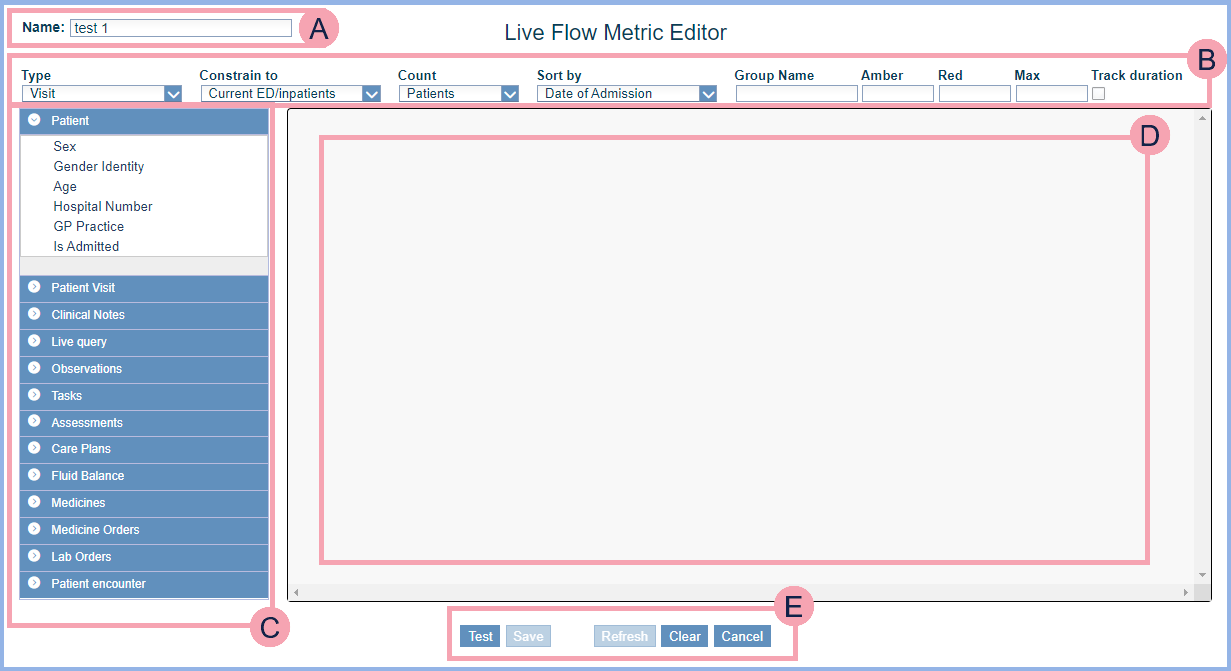
Enter a name for the live query. |
|
|
Select and enter attributes for the live query. Attributes change:
|
|
|
Select criteria to build a live query. The criteria you choose changes what the live query returns. For example, you select the criterion 'Age' and enter 18. The query returns patient's aged 18. The criteria available depends on the type of live query. The type is an attribute. |
|
|
The query appears here. Select item to edit them. You can select different operators to change what the live query returns. For example, you select the criterion 'Age' and enter the age 18. If you select the operator '>', the live query returns patients over the age of 18. |
|
|
Select Test to make sure your query returns the results you want before you save your live query. |


Did you find this article helpful? Yes No
Sorry about that. Our help is a work in progress and we welcome any feedback.
Why wasn't this helpful? Please select one reason:
Great!
Thanks for taking the time to give us some feedback.